PROMPT RECORD · 公开作品详情
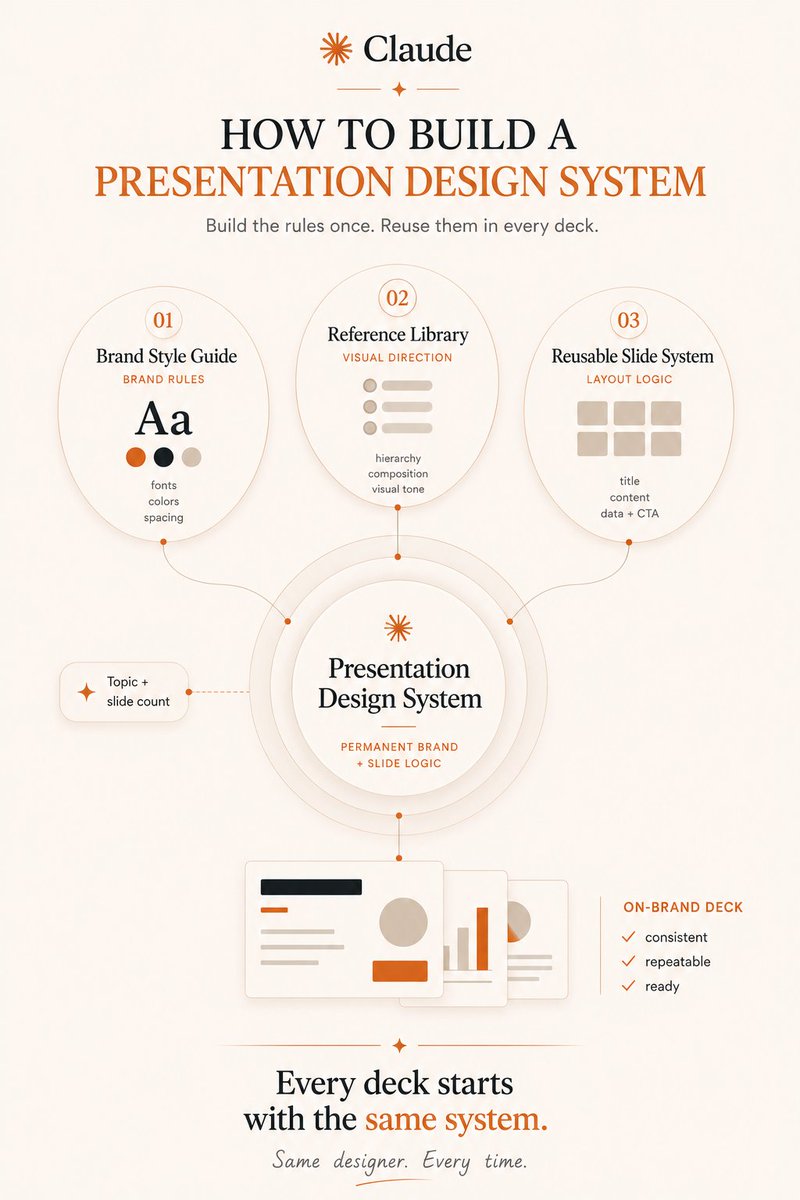
"你是我的首席品牌设计师。帮助我为演示文稿构建一份完整的品牌风格指南。请向我询问以下问题:——我的受众——品牌个性——颜色和 HEX 编码——…
公开 AI 图像创作记录,包含原图、提示词、使用模型、作者、标签与来源。
- 使用模型
- None
- 创作者
- @anjela_petkova
- 发布时间
- Fri Jul 24 18:31:42 +0000 2026
- 图片数量
- 1 张
完整提示词
源提示词按原始换行与标点完整保留"You are my lead brand designer. Help me build a complete Brand Style Guide for presentations. Ask me questions about: – my audience – brand personality – colors and HEX codes – typography (title / body / caption fonts) – slide spacing and composition – the visual tone I want (bold / minimal / corporate / warm) – presentation references I love. Then organize everything into a Brand Style Guide.md that will be the foundation for every deck I create." What it does: Claude knows your visual rules before touching a single slide. 2. Reference Library Upload screenshots of presentations you love: from LinkedIn, Slideshare, speaker decks, brands you admire. Then tell Claude: PROMPT: "Analyze these presentations. Find the recurring design patterns. Don't recreate them. Extract reusable principles that fit my Brand Style Guide: slide structure, visual hierarchy, how they use white space, how they handle data slides." What it does: Claude learns what good looks like in your world. 3. Reusable Slide System PROMPT: "Based on my Brand Style Guide and Reference Library, create reusable layouts for: – title slides – content slides – section dividers – data and chart slides – quote slides – framework slides – CTA slides. Every presentation I create should use these layouts automatically." What it does: you stop designing. You start filling in content. 4. New Presentation Requests Now every time you need a deck, you only write: PROMPT: "Using my Brand Style Guide, Reference Library and Slide System, create a presentation about [topic] with [number] slides." That's it. Claude already knows the rest. Most people redesign every deck from scratch. The best users build a system once and let Claude fill the slides. https://t.co/5GwrFgW8JC
提示词译文
译文与源提示词分开显示,不替代原文"你是我的首席品牌设计师。帮助我为演示文稿构建一份完整的品牌风格指南。请向我询问以下问题:——我的受众——品牌个性——颜色和 HEX 编码——字体排版(标题 / 正文 / 字幕字体)——幻灯片间距与版式——我想要的视觉风格(大胆 / 极简 / 企业 / 温暖)——我喜爱的演示文稿参考。然后将所有内容整理成一份 Brand Style Guide.md,作为我创建的每一份幻灯片的基石。" 它的作用:Claude 在接触任何一张幻灯片之前就已经了解你的视觉规则。 2. 参考库 上传你喜爱的演示文稿截图:来自 LinkedIn、Slideshare、演讲者幻灯片、你欣赏的品牌。 然后告诉 Claude: PROMPT:"分析这些演示文稿。找出反复出现的设计模式。不要复制它们。提炼出适用于我的品牌风格指南的可复用原则:幻灯片结构、视觉层级、它们如何使用留白、它们如何处理数据幻灯片。" 它的作用:Claude 在你的世界里学习什么是优秀的设计。 3. 可复用幻灯片系统 PROMPT:"基于我的品牌风格指南和参考库,为以下内容创建可复用的版式:——标题幻灯片——内容幻灯片——章节分隔页——数据和图表幻灯片——引言幻灯片——框架幻灯片——行动号召 (CTA) 幻灯片。我创建的每一份演示文稿都应自动使用这些版式。" 它的作用:你不再需要设计。你只需填入内容。 4. 新的演示文稿请求 现在每当你需要一份幻灯片时,你只需写: PROMPT:"使用我的品牌风格指南、参考库和幻灯片系统,创建一份关于 [topic] 的演示文稿,共 [number] 张幻灯片。" 就这样。Claude 已经知道其余的一切。 大多数人每次都从零开始重新设计幻灯片。 最聪明的用户构建一次系统,然后让 Claude 来填充幻灯片。 https://t.co/5GwrFgW8JC