PROMPT RECORD · 公开作品详情
"为应用吉祥物设计一个可爱的幽灵"
公开 AI 图像创作记录,包含原图、提示词、使用模型、作者、标签与来源。
- 使用模型
- GPT Image
- 创作者
- @booya_tech
- 发布时间
- Sun Jun 14 10:00:26 +0000 2026
- 图片数量
- 1 张
完整提示词
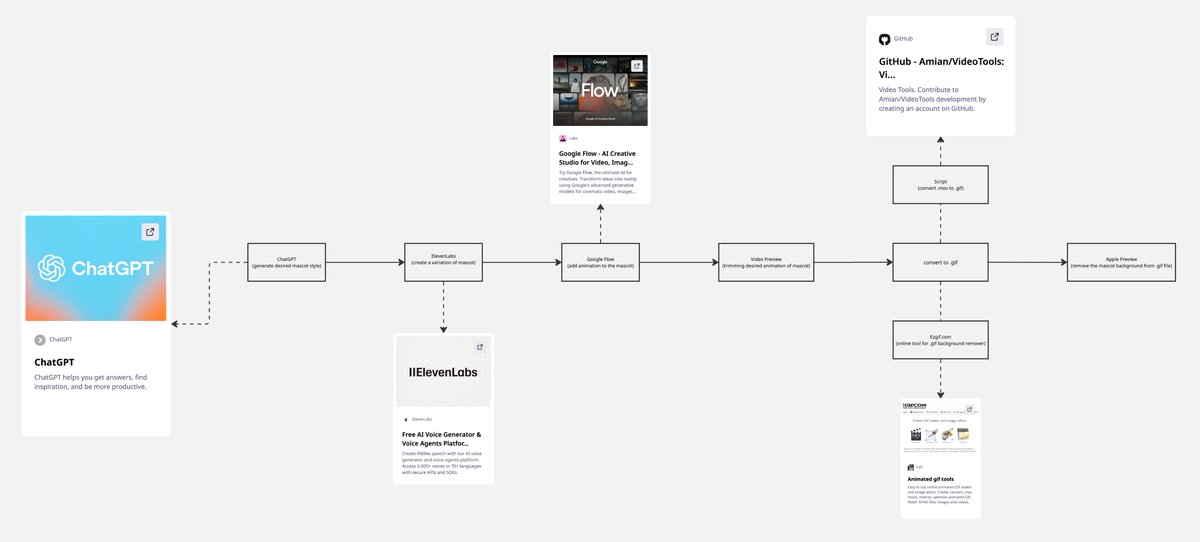
源提示词按原始换行与标点完整保留"create a cute ghost for an app mascot" No prompt engineering — just describe what you want and iterate from there. 2. Create a variation Took that base design into ElevenLabs to generate a refined variation — dialing in the look before animating it. 3. Add animation Dropped the mascot into Google Flow to bring it to life. This is where it goes from static art to something with personality. 4. Preview & Trim Reviewed the generated animation and trimmed it down to just the loop you wanted — short, clean, and ready to export. 5. Convert to GIF .mov → .gif via a quick script (https://t.co/Cm0QMja89o works great too if you'd rather not write code). Now it's ready to drop straight into the app. End to end flow: ChatGPT → ElevenLabs → Google Flow → trim → GIF Building MonoTimer in public — sharing more of this process every week
提示词译文
译文与源提示词分开显示,不替代原文"为应用吉祥物设计一个可爱的幽灵" 不需要复杂的提示词工程 —— 只要描述你想要什么,然后不断迭代即可。 2. 创建一个变体 将基础设计带入 ElevenLabs,生成一个精细化的变体 —— 在制作动画之前先打磨好外观。 3. 添加动画 将吉祥物放入 Google Flow,让它活起来。这是它从静态插画变成有"个性"的角色的关键一步。 4. 预览与剪辑 查看生成的动画,并将其剪辑为你想要的循环片段 —— 短小、干净,随时可以导出。 5. 转换为 GIF .mov → .gif 通过一个简单的脚本即可完成(https://t.co/Cm0QMja89o 也很方便,如果你不想写代码的话)。现在它可以直接放进应用了。 端到端流程:ChatGPT → ElevenLabs → Google Flow → 剪辑 → GIF 公开构建 MonoTimer —— 每周分享更多这样的过程